Syslog Watcher does not upload to S3 by itself. It writes a compressed archive on disk. You copy that folder to a bucket. The local archive can then be short — 30 days, for example — while the bucket keeps the older files.
The same copy works for any store the AWS CLI can address, including S3-compatible endpoints. This page uses Amazon S3.
What you need
- A Syslog Watcher server that is already receiving messages.
- An S3 bucket, and an IAM user that can write only that bucket. The bucket and the access keys are created in AWS. Do not use the account root keys.
- The AWS CLI on the same Windows server, or on a host that can read the archive folder.
Turn on the local archive
On Syslog Watcher 7: Server toolbar → Server → Server Configuration → Syslog Archive. Turn the archive on, set the directory, and set how many days to keep the local files. A password makes the archive files unreadable without it. S3 will store those files as they are. The password is not an S3 setting.
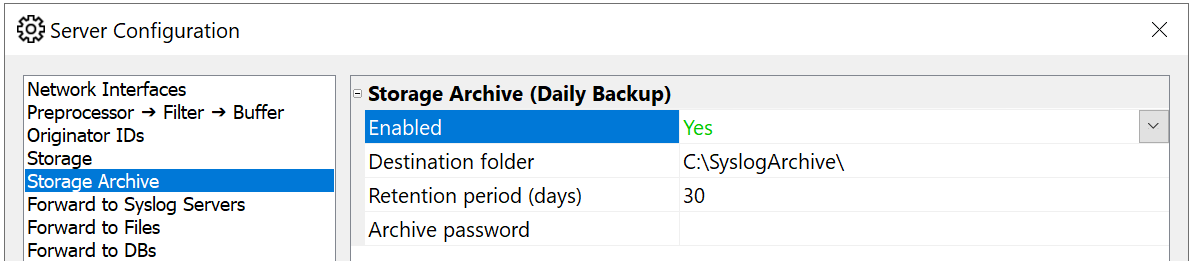
The archive is a daily copy of storage, compressed, and optionally protected. Directory, retention, and password are described in the 6.5 storage archive page. In version 7 the same settings are the Syslog Archive page of Server Configuration.
Wait until that directory contains archive files before the first upload. An empty folder syncs nothing.
Install and configure the AWS CLI
Install the AWS CLI if it is not already there:
https://awscli.amazonaws.com/AWSCLIV2.msi
Then run aws configure as the Windows account that will perform the copy. Enter the IAM user’s access key, secret key, and the bucket’s region.

A scheduled task that runs as a different account will not see these keys. Configure the CLI as the same account the task uses.
Upload once, by hand
Open a command prompt as that account, change to the archive directory, and sync it:
aws s3 sync . s3://your-bucket/syslog-archive/Replace your-bucket with the bucket name. The prefix syslog-archive/ keeps these files out of the bucket root. The first run uploads everything in the folder. Later runs upload only what is new or changed.

If the command reports access denied, the IAM user cannot write that bucket, or the region in aws configure is not the bucket’s region. If it reports that the folder is empty, the archive has not written a file yet.
Copy the archive every day
The archive is refreshed once a day. Schedule aws s3 sync to run after that refresh, from the archive directory, as the account you configured.
Windows Task Scheduler can do it. Create a basic task, set it daily, and set the action to start aws with the arguments above. The screenshots show that wizard.

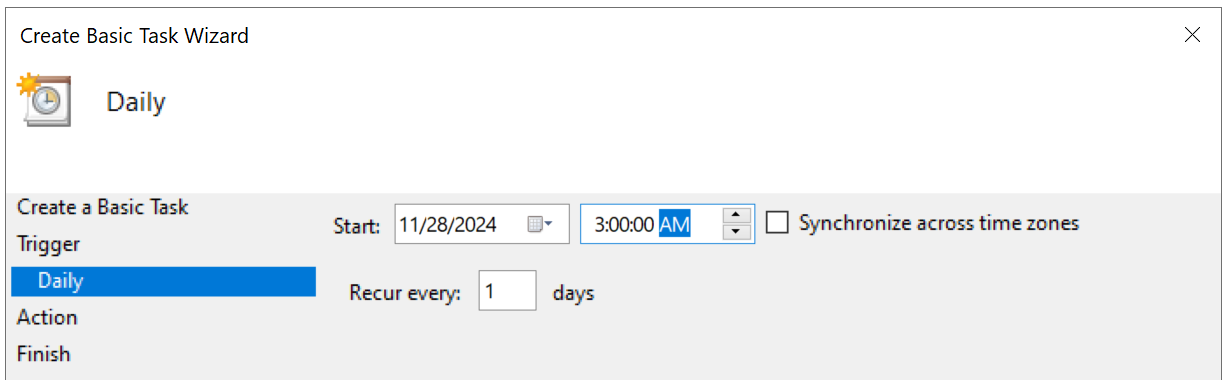
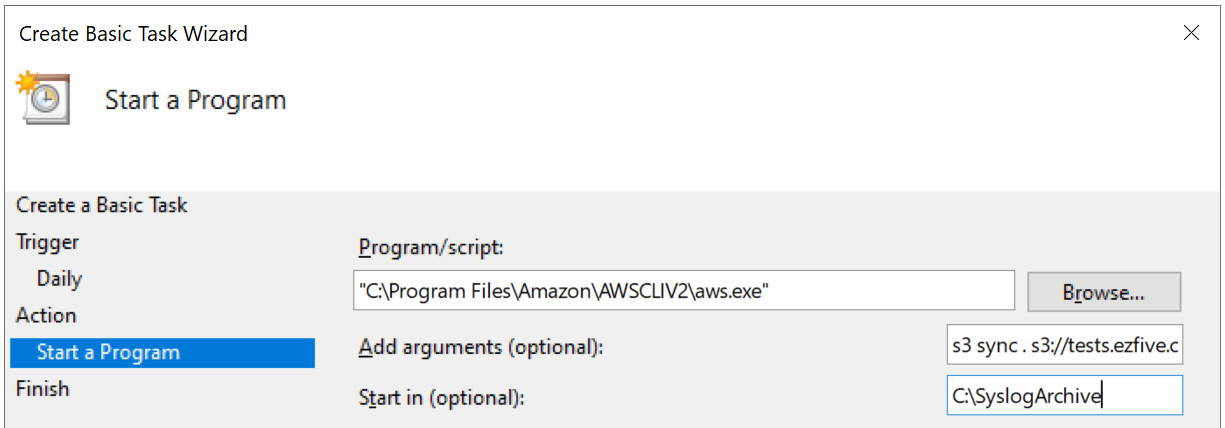
On the task’s general page, choose Run whether user is logged on or not, and use the account that ran aws configure.
Syslog Watcher 7 can run a script when the archive sync finishes, which is the same aws s3 sync line without a separate task. That change is in What’s new in Syslog Watcher 7.0. The scheduled task still works if you do not use the script.
A short disk copy and a long bucket copy
aws s3 sync does not delete objects in the bucket unless you add --delete. Leave that flag off.
Set the archive retention to the number of days you want on the server. The bucket keeps files the server has already removed. That is the point of the copy: the disk stays bounded, and the older archive stays in S3.
To read a file back, download it from the bucket. If you set an archive password, you still need that password. The bucket policy does not unlock the file.